

Monitoring Agents State
On the Agents page, you will find a comprehensive overview of all your self-hosted agents and their respective states. The states reflect the current operational status of each agent and provide valuable information about their behavior.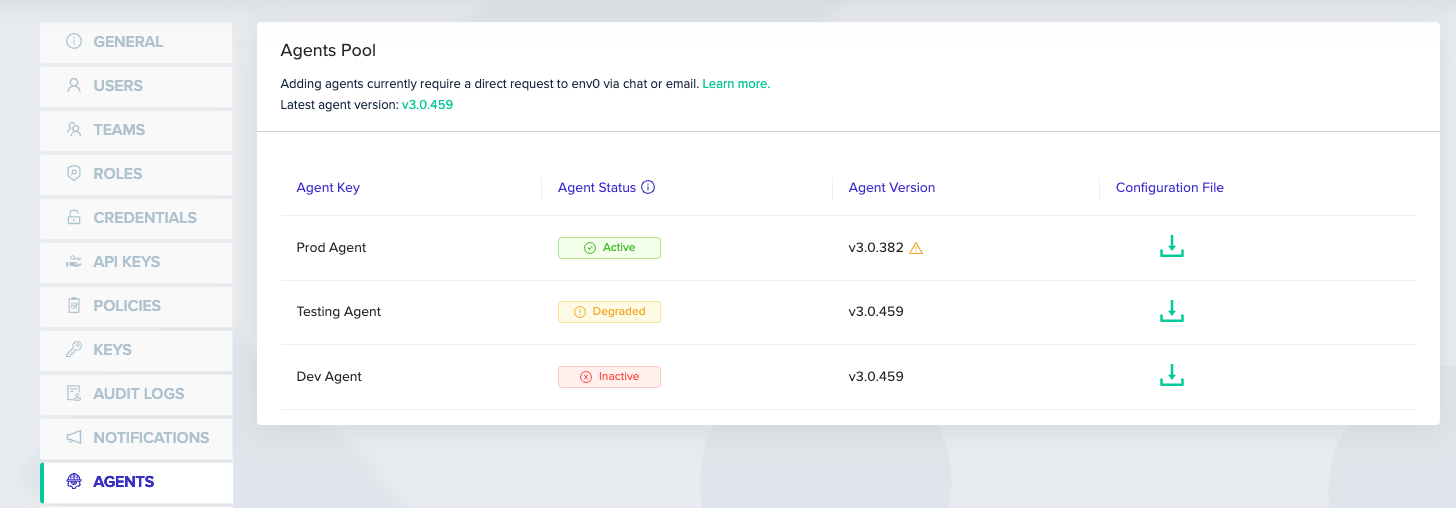
Active: Indicates that the agent is functioning properly and is ready to execute deployment jobs.- Active agents are waiting for jobs to be assigned.
- 11 minutes of activity will mark the agent as Active.
Inactive: No agent has been detected. The agent might not have been installed or not been able to reach env zero.- 11 minutes of inactivity will mark the agent as Inactive.
Degraded: An agent that is able to poll env zero but not start jobs. The degraded state indicates that jobs are queueing up with no runners to execute them.- A job waiting in the queue for more than 5 minutes, while the agent runs no other job, triggers the degraded state.
- Jobs waiting while the agent is running other jobs do not trigger the degraded state. The agent is at capacity, not unhealthy.
Next steps
- Troubleshoot agent crashes
- Set up a failover agent in case the primary cluster goes down