

Create a file named env0.yml under the template folder. env zero will use this file if it’s found in your git repository. For sharing a custom flow between templates:
Create a file named env0.yml under the root folder. env zero will use this file if it is defined, and an env0.yml file is not found in the template folder. For sharing a custom flow for all environments under a particular project:
Create a custom flow file in any repository and configure it as a project policy. We support the suffixes env0.yml and env0.yaml in the same way.
Working Directory for env0.ymlenv zero will run Custom Flow commands with the working directory being the one containing the YAML file. Based on that, you can reference your commands to other scripts/commands by using
./script.sh.Project level Custom FlowsOnly the env0.yaml is “cloned” for project level Custom Flows, this means that scripts and other files referenced by your Custom Flow will either need to be cloned into the working directory, or you must specify the repo path location of your scripts and files.
env0.yml file) is here):
OpenTofu backward-compatibilityTerraform’s Custom Flow format is interchangeable with OpenTofu’s.
Task hooksTask hook uses the stored working directory source code to run, it will not fetch an updated version from you VCS provider. If you need updated files on your working directory to run the task hooks you will need to first run a deployment to update the files.
Hook Stages
Specifying the Shell
Currently, env zero’s Custom Flow features allow you to select the shell:sh (default) or bashTo use
bash, add the following snippet into your_ env0.yaml_:
Handling Errors
If any command in your custom flow returns a non-zero exit code, the env zero deployment will stop on a ‘Failed’ status. You can use this to perform validation. For instance, asserting that a certain environment variable was supplied. In such a case, env zero will display any output fromstderr as the deployment error. If no output is found in stderr, it will be shown as an ‘Unknown Error’.
Error Message HandlingUse the
1>&2 notation to redirect stdout messages to stderr. This allows env zero to display the message in its UI (see I/O Redirection)env0.yml
Exposed env zero System Environment Variables
env zero exposes the following environment variables for you to use:
See this example for using these variables in our public templates repo.
NoteYou can use exposed env zero variables in the UI using the ${…} notation: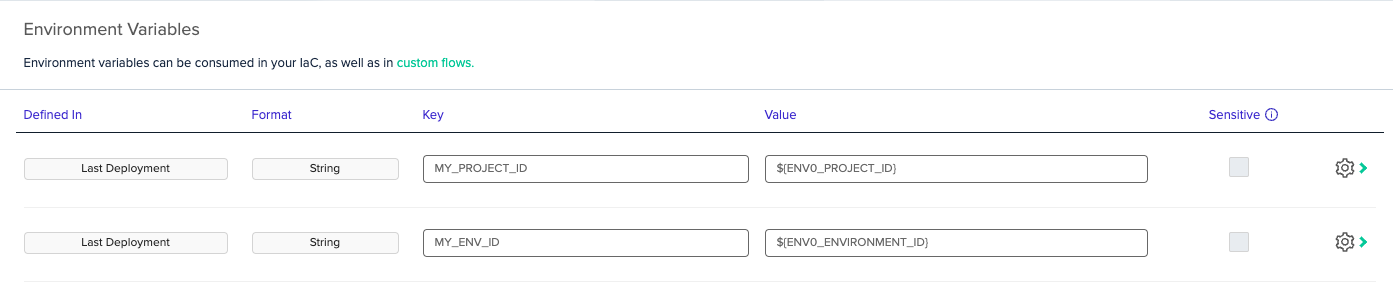
env zero System Files
env zero generates a few files during runtime that can be used in a custom flow (and terraform) to help you programmatically access environment variables and Terraform variables.env0.system-env-vars.json
This file contains all the environment variables generated by env zero through metadata. See above for list of available environment variables and their respective descriptions.env0.auto.tfvars.json
This file contains all the variables defined through the UI in json format. For example, you can parse the file using jq.env0.env-vars.json
This file is similar to the Terraform variables, and contains all the environment variables defined through the env zero UI. This can also be parsed using jq.Accessing Environment Variables in TerraformYou can use this file to access environment variables within your Terraform code. Simply read and jsondecode the env0.system-env-vars.json file to get access to the metadata. See example:
Using Additional CLI Tools in Custom Flows
Custom flows execute your shell commands within a dedicated deployment container. This container comes pre-loaded with a standard set of utilities, including common OS tools and package managers. However, if your custom flow hooks require specific command-line interface (CLI) tools, such as theAWS CLI or kubectl, you must explicitly configure the deployment to install them.
To add these tools, set the ENV0_INSTALLED_TOOLS environment variable with a comma-separated list of the tools you need.
For example, to make the AWS CLI and kubectl available in your deployment container, you would set the following variable:
kubectl and another uses the aws CLI, it’s best to set the variable at the project level to ensure each environment has only the tools it requires.
Available tools
Exporting your own environment variables
To export your own Environment Variable to use in any downstream custom flow you should write a shell command in the format:echo KEY=VALUE >> $ENV0_ENV.In later steps of the same deployment, you will be able to use
$KEY to access the stored value.
NoteFor _env0.yml _ files that use schema version 2, when using multiple commands within a given step e.g.,
terraform:plan-before, all commands are executed inside the same shell. Exported Environment variables like these are only available for the steps that follow.
For values within the same shell, using the usual export key=value still works.Forcing Manual Approvals
WheneverENV0_REQUIRES_APPROVAL=true occurs, env zero will force deployment to require approval, regardless of the Auto Approval setting in the Environment.
For example, instead of failing a deployment based on some policies, we can use this field to help ensure that others can still review and proceed with the deployment.
Usage:- echo ENV0_REQUIRES_APPROVAL=true >> $ENV0_ENV
NoteIf the project has Skip apply when plan has no changes enabled and the plan reports no resource changes, the deployment finishes without waiting for approval and the apply step is marked as skipped. There is nothing to apply, so there is nothing to approve. This applies to workflow sub-environments as well, through the policies of the project they belong to.An approval policy that returns a pending result still holds the deployment for approval, whether or not the plan has changes.
Repository custom flows
The Repository Custom Flows organization policy controls whetherenv0.yml files in a template’s repository run. Custom flows assigned in env zero, such as project-level custom flows, are not affected by this policy.
The Repository Custom Flows policy is rolling out to organizations. If you do not see it in Organization Settings > Policies, it is not yet available for your organization, and repository
env0.yml files run as described on this page.
When Block is selected, the Custom Flows Project Policy has no effect, because there is no repository custom flow to override or merge with.
Verified users only
With Verified users only, env zero checks every pull request plan that changesenv0.yml, and every PR comment command. To decide if a pull request changes env0.yml, env zero compares the whole pull request with its target branch, not only the latest push.
The pull request’s env0.yml runs only when the user who did the last relevant operation meets both requirements:
- They connected their VCS account to env zero, so their VCS user is verified. A VCS user ID typed in Personal Settings does not count. See Setting your VCS user in env zero.
- They have the Run Tasks permission on the environment.
- For a pull request plan, the push to the pull request.
- For a comment command such as
env0 planorenv0 apply, the comment. The pull request plan of the latest push must also have run the pull request’senv0.yml. A trusted commenter does not approve anenv0.ymlthat an untrusted user pushed.
env0.yml from the branch the environment tracks instead of the one in the pull request. env zero then comments on the pull request with the environments affected and the reason for each one:
- The user has no verified VCS user connected to env zero.
- The user does not have the Run Tasks permission on the environment.
- The latest push came from a user who is not a verified VCS user with the Run Tasks permission.
Deploying another revision
Verified users only also applies when a user deploys or destroys an environment with a revision other than the one the environment tracks, for example from the env zero UI, the API or the CLI:- If
env0.ymlis different in the two revisions, or env zero cannot compare them, the user needs the Run Tasks permission on the environment. Without it, the request fails with an error that names the permission. - If
env0.ymlis the same in the two revisions, the deployment runs theenv0.ymlfrom the tracked revision.
env0.yml always runs the tracked branch’s env0.yml.
FAQ
Q. How can I use Custom Flows to add new Terraform variables? A. The recommended approach to adding Terraform variables is to use variable definitions files, specifically the .auto.tfvars or .auto.tfvars.json files, to pass additional variables to your Terraform code. Note: Please be aware of the Terraform Variable Definition Precedence order, defined here. Another way is to create new Environment Variables inside the custom flow in the form ofTF_VAR_key=value. To do that, please follow our guide for exporting your environment variables.
Q. I noticed that env zero runs init again after approval. How can I run my custom flow only once per deployment?
A. You can take advantage of the ENV0_REVIEWER_NAME field to see if the plan has already been approved.
For example:
A. Yes, env zero uses those IP addresses for all the outbound requests. Q. How do I export a multi-line string into an environment variable?
A. Wrap the value in double quotes. env zero reads
$ENV0_ENV as a dotenv file, which keeps line breaks inside a double-quoted value: printf 'MY_PEM_FILE="%s"\n' "$(cat "$PEM_FILE")" >> $ENV0_ENV
Next steps
- Switch to the v2 step schema so each step shows as its own deployment step
- Pass variables into custom flow commands
- Build and push Docker images in a custom flow on a self-hosted Kubernetes agent